Linked Camera.py
Tested:
R20+ / download
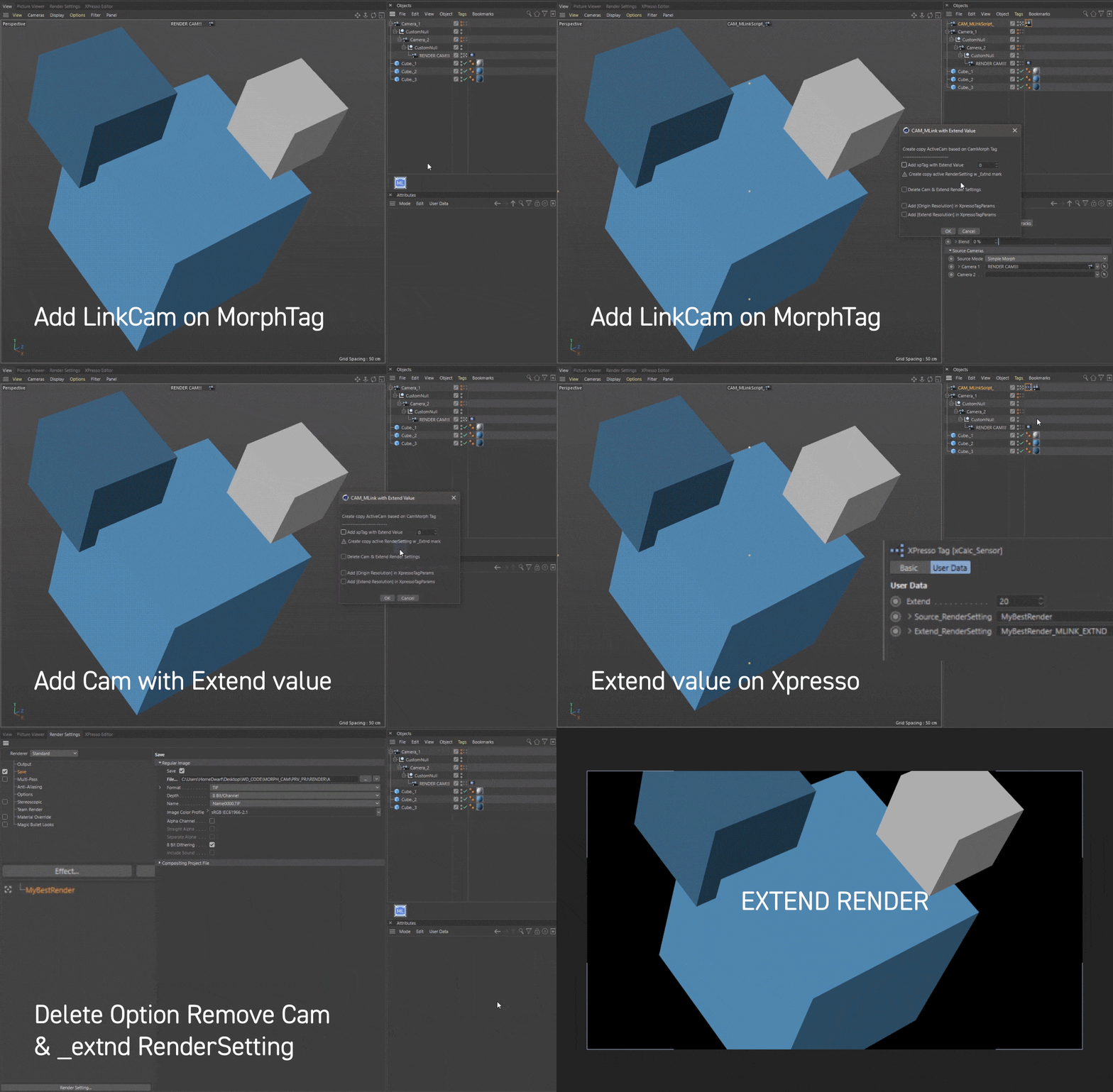
Create a camera at the top level of your scene and linked to
active one via Camera Morph Tag
Optionally adds a custom Xpresso setup with an Extend parameter to expand the render area while maintaining the original focal length…
Perfect for working with nested or heavy rigs — especially useful for baking or using scripts that require a standalone camera
Automatically creates an extended render setting with sensor-based scaling, — ideal for extended patching in post (e.g., After Effects)
One-click remove the generated camera, Xpresso tag, and render settings
Additional note: by creating your own alpha-channel mask you can effectively “patch” the render in post. With the standard renderer, you achieve this by projecting a material that carries an alpha channel from the camera onto your scene. It’s a clever workaround—though I’m really hoping the Maxon team will one day build in a true “Negative Render Region” feature! :)
Assembled by AleksandrovskyV,
with assistance from ChatGPT
Feel free to fork, break, or improve this setup 🔧
cinema-4dc4dcinema-4d-scriptxpressopythonai-assisted
one-click-toolscg-toolsexpand-render-areanegative-render-region